
• ⚠️ Possible issue on January 1
    The current SSL certificate expires on January 1, 2026. It should auto-renew automatically.
    If the site shows as “Not Secure” after that day, you can temporarily bypass the warning by searching Google for:
    “how to ignore expired certificate Safari or your browser.”

    For more information and detailed browser-specific workarounds, click here . This thread will be kept updated.

Wireless photo transfer from camera

Evan

Administrator
Donating Member
I just got this nifty SD card that somehow has a built in WiFi hotspot. When you take a picture after about 3 seconds, it magically appears on your computer or iPad screen. It works with almost any SD camera. I was skeptical, but I got it today and it actually does what it says. I tried it on three different cameras, two of them older, and they all worked.
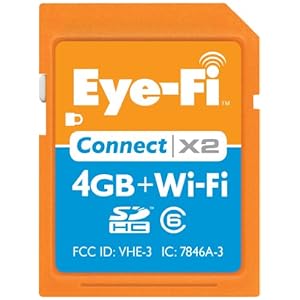
516JpxjhtrL._SL500_AA300_.jpg


It's pretty neat to see your photos full screen on the iPad just seconds after you take them - without any cables!

http://www.amazon.com/gp/product/B003DV4234
 
Last edited:
Evan,
what a neat find - I am just dealing with our trip photos and can see how neat that would be. I have to have one. When you say you have multiple cameras and they all work that is good. Now if you have 3 computers you want to have the pictures saved on - will that work? Can you choose the size you want the photos to be saved as.
Pat
 
It says you can set the card to talk to 20 different wireless networks, so I imagine you can transfer to multiple computers. Although, if you have three computers wouldn't they be on one network? If so, it's should be simple thing to copy the folder around.

One thing to keep in mind is that the camera must be on when it is transferring, because that's where the card gets its power. Some cameras have auto shutoff after one minute, so if you were trying to transfer a bucketload of photos to three different computers you may have some trouble keeping the camera from shutting off for that period. The reason I'm going with the iPad is to keep the uploads short and often.

I don't think it will resize your photos - so you should shoot them in the size you want to be saved. Very large photos take longer to transfer.
 
Thanks Evan. Yes they are on one network so you are right that would be easy. We have iphones so not ipad but usually carry one laptop.
 
Dave - you can choose or just go with automatic. For me the whole point was for everything to be automatic and wireless.
Also, you can set it up to upload the pictures to an online photo sharing site like Shutterfly or Facebook. I haven't done this so I can't say how well it works, but it is there.
 
the product does have some bad reviews, so think this through before jumping on it

I think I will wait until it is more bulletproof, as I refuse to risk losing any photos

but it is a very cool idea
 
Evan,
The new technology, and the gadgets which utilize it, just keep coming. How were you transferring your photos to your iPad previously? Is there a USB port on the iPad that your camera transfer cable fits into? I am considering the iPad but seem to be under the impression that your are somehow "tethered" to a home computer (which could be a laptop I presume)that your iPad has to sync with to utilize any third party software. For instance, you mentioned in another thread a photo "resizing" program that you use, are you able to load that program onto your iPad?
Jim
 
I'll let you know how it works for me.
We lose enough photos as it is when our 6-year-old accidentally erases the memory card. I'm happy to have them automatically transferring.
 
Evan said:
I'll let you know how it works for me.
We lose enough photos as it is when our 6-year-old accidentally erases the memory card. I'm happy to have them automatically transferring.

:-)
 
Also, I'm not sure how it would be possible to lose photos - technically challenged perhaps? The photos aren't erased off of the card when it magically transfers to the computer.
 
Evan,
As I'm sure you know, erasing the storage disc upon transfer is a menu selection in either your camera or your computer. Might it have been selected previously? Also, I have "erase all" come up as a selection when deleting a photo on my Canon and have to be sure to select that single photo.
Jim
 
? on how you would loose photos????

wouldn't they still be on the card to manually download if desired? I haven't read up on anything yet except what's on here but will be reading....I like the idea.
 
Yes, they are still on the card. So, I'm not sure how the reviewers managed to lose photos - I certainly haven't lost any.
 
Back
Top